
The context window
Every model has a limit on how much it can read at once: its context window. Everything ZettCode sends in one request competes for that budget — the instructions, the tool schemas, your messages, the model's messages, the output of every tool, and the summary an earlier compaction left behind. Nothing is sent outside it.
/context opens a page about the newest request: how full the window is, how close it is to being compacted, and where the tokens in it came from. The status line's ctx figure is the same measurement, in short.
/contextIt is a picture of the last request the model actually received, not of the transcript on your screen. A request you have typed but not sent is not in it, and text that a tool call produced is in it only once it has been sent back. Esc closes the page, and opening it mid-request is safe: it reads and changes nothing.
If the page says No request yet, this session has not sent one. Send a message, or resume a session that has.
Reading the picture
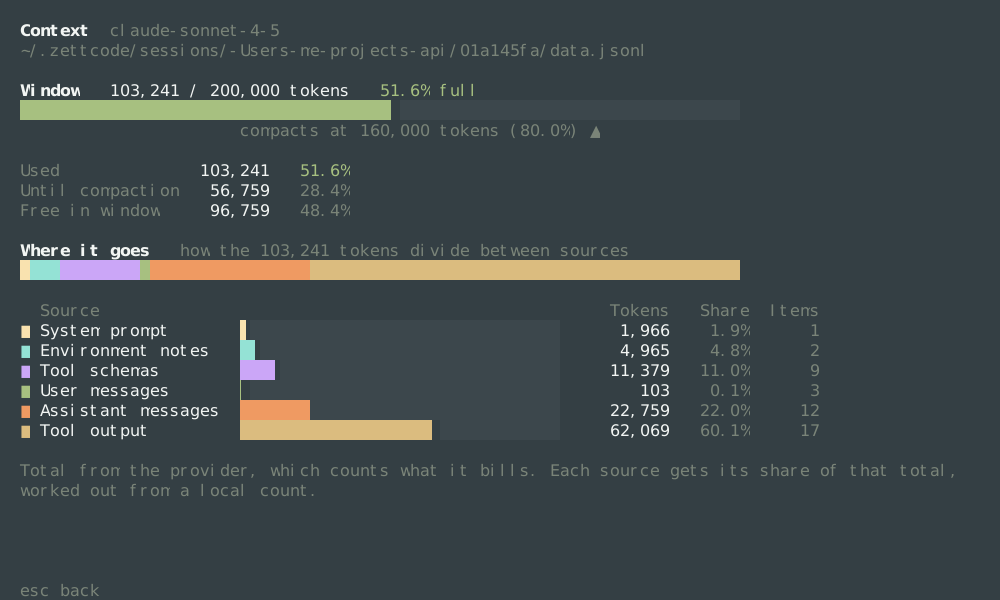
The window
Window 103,241 / 200,000 tokens 51.6% fullThe first number is what the newest request carried; the second is the model's configured window (context_window in config.toml); the third is the two divided. 51.6% here means the request fills a little over half of what the model can hold.
The bar under it is that same figure drawn to scale, and its colour is about danger, not size: green well below the compaction point, amber from three quarters of the way there, red at it. With the mark at 80%, amber begins at 60% of the window, which is why the 51.6% request above is green and the 79.5% one below is not. The ▲ marks the point where the request is summarized and sent shorter instead.
compacts at 160,000 tokens (80.0%) ▲That point is compact_percent of the window — 80% here, so 160,000 of 200,000. Reaching it does not mean the window is full: it is the point where ZettCode stops sending more and compacts first, so that a long turn never ends in the provider's "context length exceeded". See Compaction below.
Moving the mark
The row above the keys, Compress at, is a rail with a knob on it: where the window is compacted, as a share of it. ← and → move the knob by five percent (a click on the rail sends it there). The knob is one dot that slides along a rail running from calm green through amber to red, and the ▲ under the gauge, the number and the Until compaction line travel with it, so you see what the new point does to the request in front of you before you decide. Nothing is written until Enter, which writes compact_percent into this model's entry in config.toml and applies it to the next request; Esc leaves it as it was. If the file cannot be edited the change holds for this run and the line says it was not remembered. With reduced motion the knob is simply there.
Then the same budget as three numbers, each a share of the window:
| Line | What it is |
|---|---|
Used | Tokens in this request. The same number as the first on the Window line. |
Until compaction | What can be added before the request is summarized. This is the number to watch: it is the real headroom. |
Free in window | What is left before the model cannot take the request at all. |
Until compaction 56,759 and Free in window 96,759 differ by exactly the mark's 40,000 tokens, because the two answer different questions: how much before work gets summarized, and how much before the request is refused.
Where the tokens went
Where it goes   how the 103,241 tokens divide between sources
████████████████████████████████████████████████████████████████████████
One bar, divided between the sources in the colours below, so the whole of the request is visible at a glance. Each of its segments has a row of its own underneath, with a bar on the row's own scale — a source too small to pick out of the top bar is still visible there.
| Source | What it holds |
|---|---|
System prompt | ZettCode's own instructions: how to use the tools, the working directory, the date. Set once, and stable on purpose, so the provider can cache it. |
Environment notes | The later system messages: your project instructions (AGENTS.md and the like), and the notes ZettCode adds at the start of a session. |
Tool schemas | The definition of every tool offered with the request — name, description, and argument schema. Nine tools means nine of these, whether or not one was used. |
User messages | What you typed, including a question asked with /btw. Images cost a fixed count each rather than their file size. |
Assistant messages | What the model wrote: its answers, its reasoning when the provider returns it, and its tool calls with their arguments. |
Tool output | What tools returned: file contents, command output, search results. Usually the largest row, and the one that grows fastest. |
Compaction summary | The summary an earlier compaction left in place of the older conversation, one item. Only there after a compaction. |
Items counts what Tokens was added up from: messages, tool definitions, summaries. It is not a count of turns, and it says nothing about size — one tool result can be larger than twenty messages.
Share is each source's part of what was counted, so the rows add up to 100%. Note what that means: Tool output 60.1% and 62,069 tokens are not 60.1% of the window, they are 60.1% of the counted request — which is what this section is for. The window's own percentage is on the Window line and nowhere else.
The footnote: whose number is it
The last lines say where the total came from, and this changes how to read the rows:
Total from the provider, which counts what it bills. Each source gets its share of that total,
worked out from a local count.
That is the normal case. It means:
- the total is the provider's own count of the request it received, which is what it bills;
- the split between sources is ZettCode's, from a local count, because no provider reports a breakdown;
- so each source is shown as its share of the provider's total — the rows divide the 103,241 exactly — and the count inside the bar is a proportion, not a measurement.
A local count is right about what is bigger than what, and not exact about absolute size: it uses one tokenizer and the model may use another. That is why you never see the local total here as a number of its own.
A request near the edge
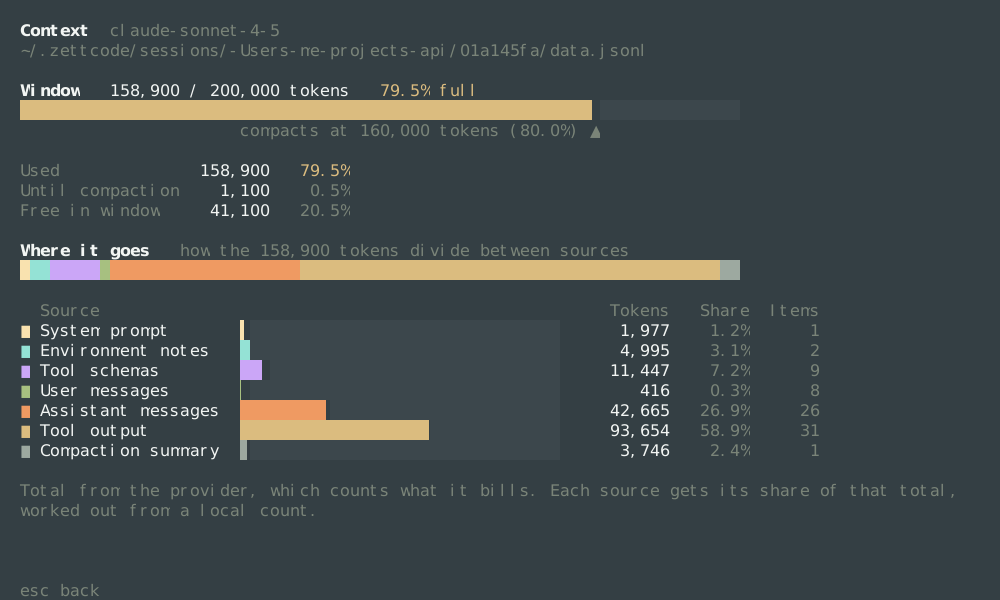
This is the same page later in a long turn. The gauge is amber, Until compaction is down to 1,100, and a seventh source has appeared: Compaction summary, the earlier conversation that was already replaced by a summary, 3,746 tokens that hold what thousands used to. Assistant messages and Tool output have both grown, and Tool output is now 93,654 tokens — a few long reads and test runs.
When the next request would cross 80.0%, ZettCode compacts instead of sending: the older part becomes one summary, the newest quarter of the trigger stays verbatim, and the request goes out shorter. See Compaction.
A session just reopened
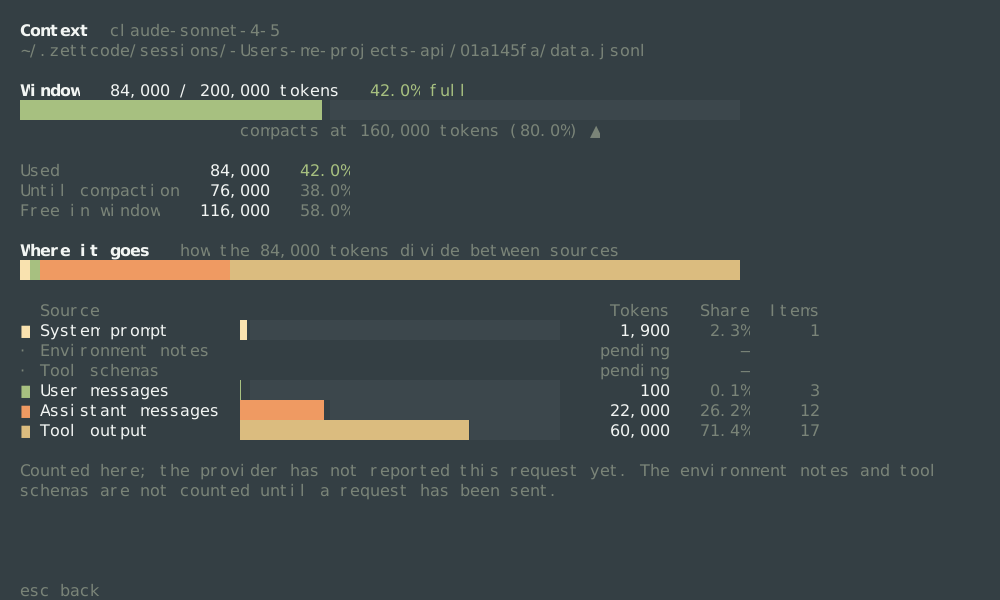
Two rows say pending and their swatch is a dot rather than a square, and the footnote is different:
Counted here; the provider has not reported this request yet. The environment notes and tool
schemas are not counted until a request has been sent.
This session was resumed, and nothing has been sent from it in this process yet. Tool schemas and Environment notes are built at the moment a request is assembled — they belong to the request, not to the conversation — so until one is sent they cannot be known, and ZettCode does not guess them. The total is counted here rather than from a provider, and the rows do not add up to the window because two sources are missing from them.
Read it as a lower bound: it is already 42.0% full, and it will be somewhat larger once those two rows arrive. Send one message and run /context again for the complete picture.
The numbers, and what they are not
| Question | Answer | Where |
|---|---|---|
| How full is the window? | request ÷ window | Window … 51.6% full, and the status line's ctx |
| How much before a summary? | compact at ÷ window | compacts at 160,000 tokens (80.0%) ▲ |
| Where does the context go? | source ÷ counted | the Share column, adding up to 100% |
| Whose count is it? | the provider's, when it reported one | the footnote |
| Is the split exact? | no: one tokenizer's proportions, placed inside the provider's total | the footnote |
Do not confuse the two percentages: the status line's ctx 51.6% is about the window, while a row's 60.1% is about the request. A row can be 60% of the request and 30% of the window.
About four characters to a token in the footnote means no tokenizer was available — its vocabulary is fetched over the network the first time — and the split is the rule of thumb. The shape of the picture is still right; the absolute tokens in the rows are approximate.
If a row is surprisingly large
That row is the thing to look at, and each of the big ones has a known cause:
| Row | Usual cause | What to do |
|---|---|---|
Tool output | A long file read, a verbose command, a huge search result | Read a range instead of the whole file, narrow the command's output, or let /compact replace the older results with a summary |
Tool schemas | Many tools offered: every MCP server, every skill, every built-in | Turn off what you do not use ([mcp], [skills]); a schema is paid for on every request, used or not |
Assistant messages | Long answers, and reasoning returned by the provider | Nothing wrong: this is the conversation. Compaction is the lever |
Compaction summary | A summary that is itself large | Expected once; if it grows with every compaction, compact later rather than more often |
Environment notes | Large project instructions, or a large skills index | Trim the instructions; they are read on every request |
Compaction
When the newest request would cross the trigger, the conversation is summarized before it is sent: the older part becomes one summary message, and the newest quarter of the trigger stays verbatim, so the model keeps the immediate context and loses only what was already said. /compact does it immediately.
A summary is stored as its own kind of record, not as a delete. That is why the transcript still ends with Conversation checkpoint, why the models panel keeps working, and why a session compacted yesterday still resumes correctly. Asking by hand keeps only the last turn verbatim, where the automatic pass leaves a quarter of the trigger behind.
What compaction costs
Summarizing is one model call, so it takes a few seconds — the transcript shows Compacting while it runs. It is worth doing early rather than late: the alternative is an endpoint error at the moment you are in the middle of something. If a summary would not be smaller than the text it replaces, ZettCode says so and keeps the original.
Try this after several turns or a large file read:
/context
/compact
/context
Close each context panel with Esc before typing the next command. /compact starts the summary immediately and shows an animated Compacting row. Compare the second report with the first: older details are replaced by a summary, while the recent working context remains, and Tool output drops by more than the summary adds. This is not /clear: it changes what later model requests carry, not just what is visible on screen.
If the most recent checkpoint already covers the conversation, another manual compaction is refused with a notice. Continue the conversation before trying again. A summary may lose detail; ask the model to re-read a specific file when exact text matters.
The model can also ask to compact on its own, if you let it: that is self-compaction, and it never touches the turn it is in.
Keeping the request small
Compaction is the last resort; a request that never gets large does not need it.
- Read what you need. A range of lines beats a whole file, and a narrow command beats a broad one. The output is paid for on every request until it is compacted.
- Send one version, not three. An edit that rewrites a large section leaves the old text in the conversation until it is compacted.
- Turn off tools you do not use. Every MCP server you enable, and every skill in scope, adds schemas to every request; see Skills and MCP.
- Start fresh for a new task.
/newis free; a converged conversation that no longer helps is not. - Keep the stable part stable. The system prompt and the tool list at the front of every request are what the provider caches, which is why the same request prefix is cheaper than a rearranged one. That is the
cachedfigure on the status line and thecachedcolumn in/usage.