
Token usage
/usage opens a page of what this project has spent: every session in it, every model it ran on, and every day it was used. It is a reading of what you already have — the conversations stored on this machine — not a bill, and not a live meter. Open it once and it says the same an hour later, until a session writes something new.
/usageTab or 1, 2, 3 switch between the three views: Models, Sessions and Calendar. Esc or q closes the page. The page covers the project you launched in, not the whole machine: zettcode -w ~/projects/api counts that project's sessions and leaves the others alone.
What a token is, and which ones are counted
A token is the unit a model reads and is billed in: roughly four characters of English, a word or less. Every number on this page is a token count, and every one of them is a counter the provider reported for a reply — none of it is estimated here.
| Word on the page | What it counts |
|---|---|
in / input | Every token sent to the model. A conversation is sent again with each turn, so the same older messages are counted again every time: this number grows much faster than the conversation does. |
out / output | Every token the model generated, reasoning included. |
cached | The part of the input the provider answered from its own cache, and so billed more cheaply. It is a share of in, not a separate count. |
reasoning | The part of out the provider counted as the model thinking, when it reports it. Also a share of out. |
| tokens | in + out. Cache and reasoning are already inside those two, so nothing is counted twice. |
| requests | Model calls: one per turn of the conversation, plus the ones compaction made. |
| sessions | Conversations counted — one row in /resume each. |
Counts are written short above a thousand: 740K is 740,000 and 3.14M is 3,140,000; B and T follow. Below a thousand they are written whole.
The line at the top
The same line sits above all three views, and it totals the project:
All models 3.14M tokens in 2.98M out 159K cached 61.07% 43 requests · 3 sessionsRead right to left, it is the whole story: 43 model calls across 3 sessions, of which 159,000 tokens were generated; of the 2,980,000 tokens sent, 61.07% came back from the provider's cache, which is why the input cost less than its size suggests.
cached 61.07% is always a two-decimal number. A dash instead of a percentage means the provider never reported a cache read for the input counted here, which many local and gateway endpoints do not.
Models
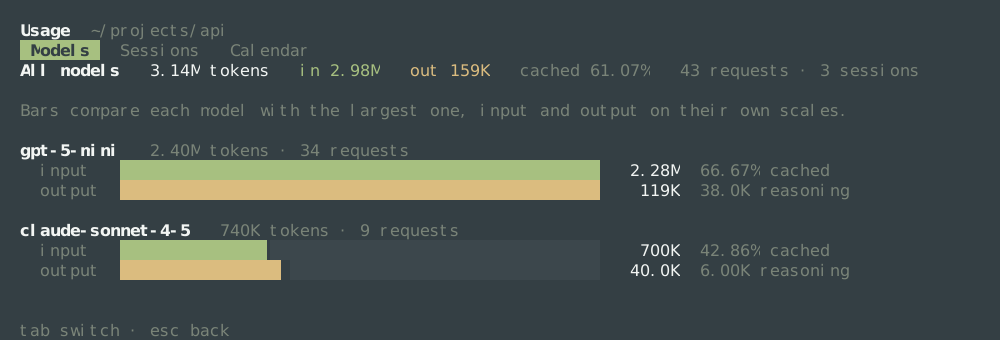
One block per model, largest first. The bars compare each model with the largest one, and input and output on their own scales: output is a small fraction of input for every model, so one shared scale would draw it as nothing. In the picture above, gpt-5-mini sends the most input and also generates the most output, so both of its bars are full and the other model's are shorter by its own share.
| Line | What it says |
|---|---|
gpt-5-mini 2.40M tokens · 34 requests | Everything that model sent and generated, and how many calls it took. |
input bar | Tokens sent, on the scale of the model that sent the most. 2.28M is this model's count. |
66.67% cached | The share of this model's input served from the provider's cache. |
output bar | Tokens generated, on the scale of the model that generated the most. 119K is its count. |
38.0K reasoning | The part of this model's output it reported as reasoning. |
A model used once on a small task still gets a block, because a cheap decision made early can account for most of the month.
Sessions
One row per session, last changed first — the order /resume uses.
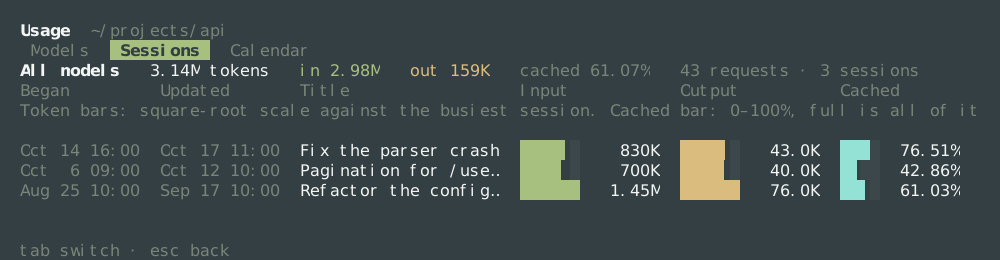
| Column | What it is |
|---|---|
Began | When the session's first counted reply was written. |
Updated | When its last one was. This is what the rows are ordered by. |
Title | The session's name, or (untitled). A narrow page cuts it with … before it gives up a number. |
Input | Tokens sent in that session, with a bar. |
Output | Tokens generated in it, with a bar. |
Cached | The share of its input served from the cache, with a bar from 0 to 100%: full means every input token came from the cache. |
The token bars use a square-root scale, so a session a thousand times smaller is still visible beside the biggest one; the numbers beside them are exact. The cache bar is a plain 0–100%, so two rows compare directly and the bar says the same thing as the percentage beside it.
The cache share is the column worth reading twice. A long session you keep returning to tends to keep it high, because its beginning stays the same and stays cached; a short one that always starts where another stopped tends to be lower. Model switches, compaction and long idle gaps all lower it. There is no "good" value: compare a session with itself after a change, not with its neighbour.
A narrow terminal gives up columns in a fixed order: the bars go first, then the cache column, then the clock, and the narrowest keeps only Updated — the time the rows are ordered by.
Calendar
A grid like the contribution graph on GitHub: a column is one week running Sunday to Saturday, a row is one weekday, and a square is one day, shaded by that day's tokens, input plus output.
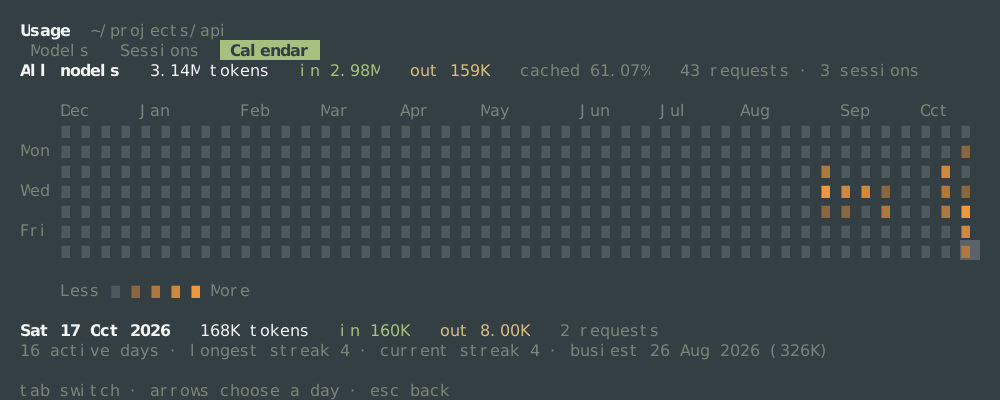
Four shades and a blank cover every day, and the shade is relative to your own days, not to a fixed number: the cut points are the quartiles of the days that were used. Someone spending a million tokens a day and someone spending a thousand both get a graph with dark days and pale ones — which is the point: the grid shows the shape of your work, not its size. The blank cell is a day nothing was spent; a day in the future is not drawn at all.
The key to five squares under the grid says Less … More, and it uses the same five shades as the days. It is worth looking at the key before the grid: a shade that is easy to see in one palette can be faint in another, and the empty cell sits right next to the palest day.
Under the grid:
Sat 17 Oct 2026   168K tokens   in 160K   out 8.00K   2 requests
16 active days · longest streak 4 · current streak 4 · busiest 26 Aug 2026 (326K)- The chosen day is the one the arrow keys moved to, and its line says what it spent, split it, and how many calls it took. A day with nothing on it says
nothing spentinstead. - active days counts the days with anything on them, ever.
- longest streak is the longest run of consecutive active days.
- current streak is the run that reaches today. If today has not been used yet but yesterday was, the streak is not broken: it is reported as it stands, because the day is not over.
- busiest names the single most expensive day and what it cost.
← → move the chosen day by a week and ↑ ↓ by a day; the line follows. A wider terminal shows more weeks, up to the 53 a year holds.
What is and is not counted
- A reply is counted once, in the session it was first written in.
/forkcopies a conversation into a new session along with what each reply cost, so the fork shows only what it spent after the fork and the earlier replies stay with the original. Nothing is counted twice. - A subagent's session is not counted. It is a session the model opened to do part of a task, not a conversation you had, and its tokens appear in the turn that asked for it.
- A day is a day in your time zone. A reply written at half past eleven at night is on the day you saw it, not on the UTC day.
- A session written by an older version counts too, as long as its replies carry their usage; a reply without it adds nothing rather than a guess.
- Compaction counts. Summarizing the context is a model call, so it appears among the requests and the tokens.
Where the numbers live
The first /usage in a project with a long history reads every conversation, which can take a few seconds for gigabytes of them. It then keeps a small usage.json beside that project's sessions — under ~/.zettcode/sessions, one folder per project — and every later /usage, in this run of ZettCode or the next, reads only what was added since. The file is a shortcut and nothing else: delete it and the next /usage rebuilds it from the conversations.
The /resume panel shows each session's entries, tokens and cached share too. The cached share keeps two decimals, as it does here, and each figure column has its own colour: the cached column is brighter the more of the input the cache served, so a column of weak caches reads dim at a glance. Those totals are kept in a second, much smaller file beside the first, sessions.json: one short line per session, so opening the panel does not read the index or any conversation unless one of them changed. It is a shortcut in the same way, and deleting it loses nothing.
Because the numbers come from the stored conversations, the page is about the project, not the process: a session you closed last week is on it, and the one you are in adds to it as it goes.
This page, or the status line?
They answer different questions, and they use different numbers.
/usage | Status line | |
|---|---|---|
| Scope | Every session in the project | This session only |
| When | Everything stored, so far | Since this session began |
cached | Share of the whole project's input | Share of this session's input |
| Grows | When a session saves a reply | While a reply is arriving |
So a session that looks modest in the status line can still be a large row on this page, and a project whose top line is large can have a small session in front of you. Neither is a bill: check the provider's own dashboard for what was charged. See Reading the status line for the ↑ ↓ cached tok/s ctx figures.
When something looks wrong
| What you see | What it means |
|---|---|
| The page is empty | No session in this project has a reply with usage in it yet. A session that only asked and was stopped before an answer spent nothing. |
cached — | The provider did not report cache reads. Nothing is wrong with the page; there is nothing to share. |
| A number much larger than the conversation | Input is counted again every time it is sent. A long conversation sent many times multiplies, and that is what the number is. |
| This page and the provider's dashboard disagree | There is no single way to count a token. The page repeats what the provider reported to ZettCode; another tool's sessions are not here. |
| A day looks too light or too dark | The shades are quartiles of your own used days, so adding one heavy day reshades the others. |