
The JIT harness
With the harness on, the model can write the tools a task needs — one or several, in one repository — load them with repo_load and call them in the same turn, so a step the task repeats becomes one tool call instead of another round of reading and typing. It is on by default.
One harness per workspace
A harness belongs to the project it was written for. A session's folder is ~/.zettcode/harness/<project name>-<hash>/<session id>/, where the hash is taken from the project's full path: two checkouts both called app get different folders, and a project whose name Windows refuses (CON) still gets one. Nothing outside a project's folder is loaded into a session working there, so tools written for one repository do not appear in another — and because the folder sits beside the session store rather than inside it, clearing sessions does not delete them.
Borrowing is the one exception, and it is asked for: see the page below.
What happens
- The model writes tools into a repository in
~/.zettcode/harness/<project name>-<hash>/<session id>/. - It loads them with
repo_load. The code is imported in a child process, so a crash or a hang stays out of your session. - It calls them like any other tool. Each step is a row you can expand.
A session keeps one repository and reuses it.
Turn it on or off
| How | Effect |
|---|---|
[harness] jit = false | Start every run with the harness off. |
/plugins | Switch it for the next start. |
/harness gen [description] | Turn it on for this run and ask the model to build tools for this workspace. |
/harness reset | Turn it off for this run. Nothing is deleted. |
# ~/.zettcode/config.toml
[harness]
jit = false/harness gen list the TODO comments in this repository, grouped by filegen passes your description to the model as the requirement. It also tells the model to keep its writes in the harness folder and not to edit your project — an instruction, not a sandbox. It is refused while a request is running.
The page
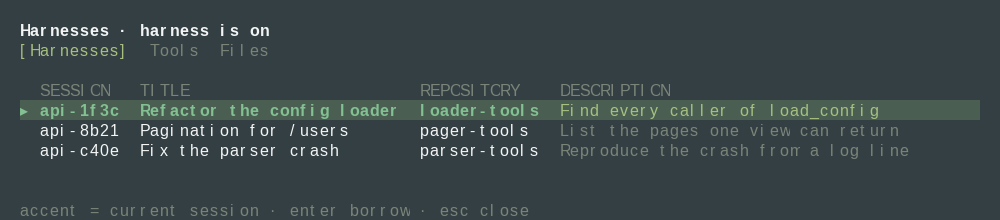
/harness opens a read-only table of every harness on the machine, which is the picture at the top of this page: one row per repository, the session that wrote it, and what it is for. Tab switches between harnesses, tools and files — so the page also answers "what can this thing do" and "what did it write down". Enter on another session's harness lends it to this conversation, which is the one way a project's tools can come from outside it; the page ends that row's description with in use. Enter on your own row gives it back; /harness reset only turns the harness off, and the loan stays. While it is borrowed, /harness gen builds in the folder you borrowed, not your own. The transcript says which harness you borrowed or gave back. The borrow is remembered with the conversation: when you resume it, in this window or a later one, it goes on working in the harness it borrowed (unless that folder is gone). The record is a small file under ~/.zettcode/harness/.borrowed/; deleting it forgets the borrow. With the harness on, that changes the tools in the request, so the next request may miss the prompt cache (see Models); with it off nothing is mounted and nothing is lost. Turning the harness off with /harness reset takes the tools out of the next request, which may miss the cache the same way. Choosing the row marked in use changes nothing and says nothing.
A harness is only listed once it has a repository: an empty folder is not yet a harness.
Where the code runs
| Shell level | Harness code runs |
|---|---|
full | With your own access. |
safe, ask | Inside the safe sandbox. |
deny | Still runs, inside the safe sandbox: it is not a shell command. |
On a machine with no working sandbox, the harness says so once per session.
The repository
A harness repository needs a MANIFEST beside __init__.py: a name, a version, a description and the tools it declares. A BAN_TOOLS file lists tool names the repository may not define. profile_tools reports how each tool has done — calls, success rate, time, input and output size, recent errors — read from the stored conversation, so it survives a restart. Its calls argument picks how much of that is counted: 0 (the default) the current context since the last compaction, a positive number the most recent that many tool calls, and -1 the whole stored conversation, compacted history included.
The library
A harness does not have to be one the model wrote in this session. The library keeps harnesses by name, outside any session, for every session of every workspace. Two commands work on it, and they are different things:
In a terminal, zettcode harness fetches and keeps repositories. It runs and exits; it never starts a session.
zettcode harness add acme/todos            # download from GitHub, show it, keep it after you say yes
zettcode harness add acme/todos@v2 --as todos-v2
zettcode harness list                      # name, version, tools, source, commit, state
zettcode harness show todos
zettcode harness update todos              # fetch the source again, show what changed, replace after a yes
zettcode harness fork todos my-todos       # your own copy, with no upstream, to change
zettcode harness remove my-todos
Inside ZettCode (the terminal window and the editor), /harness works on the session you are in:
/harness use todos          # every session in this window works in this library harness, and every start after it
/harness use --none         # each session works in its own harness again
/harness save notes         # keep this session's harness in the library under a name
/harness fork todos mine    # copy a library harness to change on its own
add needs git (install it first if you do not have it) and takes owner/repo, owner/repo@branch-tag-or-commit or a https://github.com/owner/repo address. The repository must meet the format above: an __init__.py and a MANIFEST at its root. You asked for it, so nothing else is limited, and nothing is imported to check it. Before anything is kept you see its manifest, its tools and its files, and it is pinned to the commit you saw: it never updates by itself, and update shows what changed first. Its code runs on your machine when a session loads it, in the sandbox the permission level gives the harness (none at full), so read what you are about to keep.
With use, every session works in that harness, so what the model writes goes into it and the next session finds it. The /harness page marks it in use, and the row of your own session says using library/<name>; Enter on your own row drops a harness you borrowed and goes back to this one. update refuses to overwrite changes made since the install (the state column says changed, or repository missing / record damaged for an install that was cut short or whose SOURCE.json was edited; update refuses all three until you fork or pass --force, and a cut-short update says where the old tree is); fork keeps them in a copy of their own. A session that is already running keeps the modules it loaded, so an update shows in the next one. remove is refused while the harness is the one in use: /harness use --none first. save does not work on a session that works in a library harness, since that is already in the library: fork it instead.
Limits
- At
fullit is not a sandbox: the code has your access. /harness resetstops later requests from using the tools; it does not delete the files.- A session open in another ZettCode process keeps its harness:
genthere changes nothing.
Setting: harness.jit. Commands: Commands.